he ultimate learning hack: two Gemini prompts that turn any YouTube video into a hand-drawn infographic summary in 1 minute.
64 views
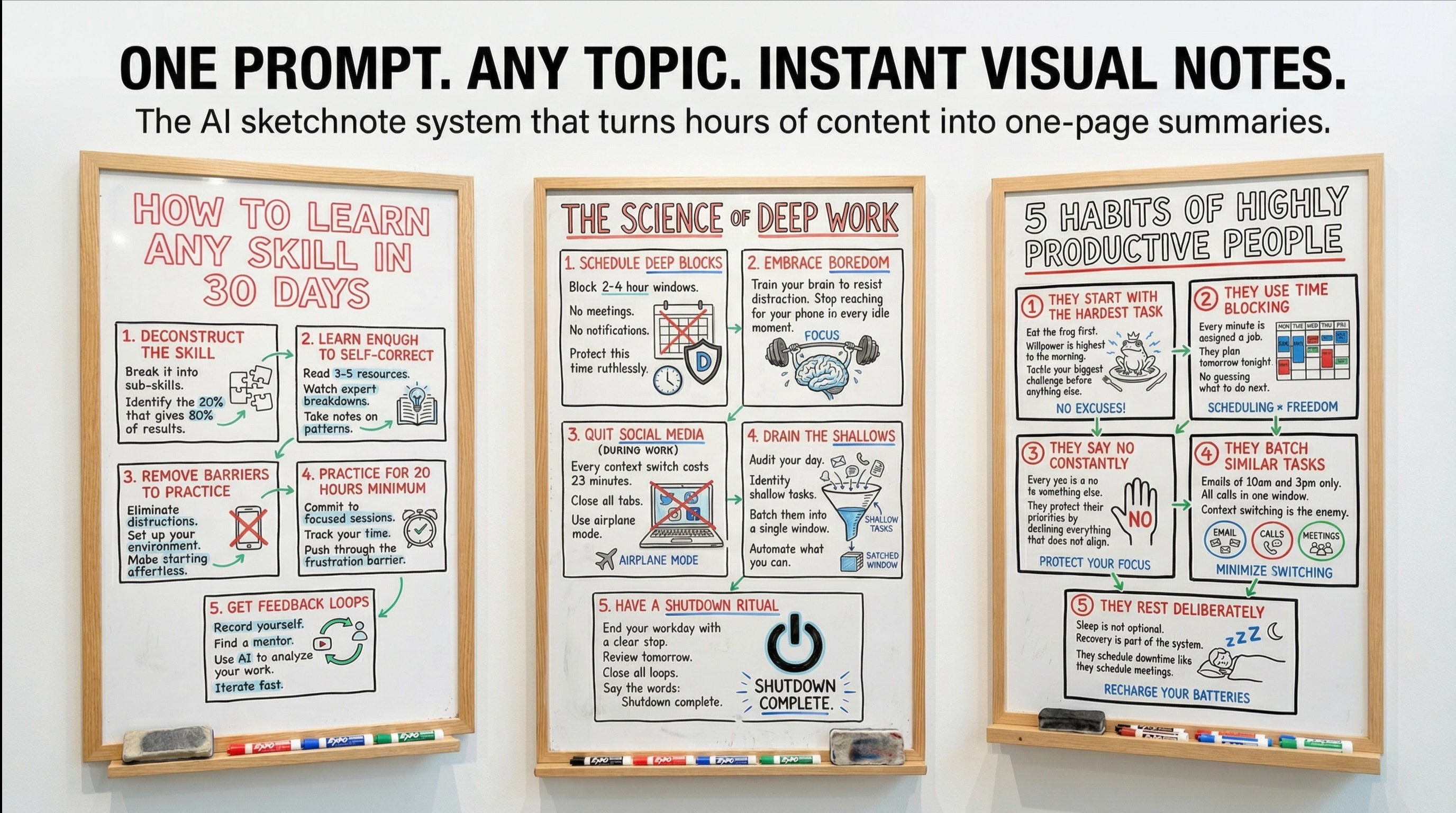
Featured Image
Run this two step prompt in Gemini
Prompt
The Two-Prompt System: Summarize, Then Visualize

The secret to making this work is splitting the task into two distinct steps. Most people try to do it all in one prompt and get mediocre results. By separating the summarization from the visualization, you give the AI a clear focus for each task, resulting in a much higher quality output.

Use this with Google Gemini AI which has a deeper connection to YouTube than other tools. Make sure YouTube is connected in your Gemini settings before running this prompt.

Step 1: The Summarizer Prompt

First, you need to extract the core ideas from the video. This prompt is designed to pull out actionable steps, not just a generic summary.

Plain Text

Analyze this YouTube video about [topic]: [YT URL]. Summarize the core concepts into a list of 5-7 direct, actionable steps. Each step should be a clear, concise instruction. Keep the language simple and direct.

Step 2: The Visualizer Prompt

Once you have your summary, you feed it into this second prompt. This is where the magic happens. This prompt is incredibly specific, and that is why it works so well. It tells the AI not just what to draw, but how to draw it, what medium to use, and what style to emulate.

Plain Text

Visualize the summary of these notes. Create a realistic photograph of a dry-erase whiteboard with a light wooden frame. The content should be presented as a hand-drawn sketchnote using 'graphic recording' style. The layout should be in 9:16 format. Style & Layout Guidelines: Medium: Whiteboard surface with dry-erase markers (not paper). Colors: Use Black for outlines, boxes, and main text. Use Red, Blue, and Green for headers and specific accents. Structure: Place the title "[TITLE]" at the top in large, open lettering. Organize the notes into five distinct, numbered rectangular boxes arranged in a grid below the title. Visuals: Include relevant simple line-drawing doodles for each point. Typography: Text should be distinct, handwritten, all-caps printing, legible and organized. Environment: Include a used whiteboard eraser and a few colorful EXPO-style markers resting on the bottom wooden ledge of the frame.
No reviews yet
Instructions
Read my reddit post on this topic ...
About the author
Co-founder of Prompt Magic and ThinkingDeeply.ai Career Chief Marketing Officer
Join Thousands of AI Enthusiasts
Discover Thousands of AI Prompts
Completely Free
Build your personal prompt library, save your favorites, and access curated AI prompts created by the community
Thousands of Prompts
Access a vast library of high-quality AI prompts for every use case
Build Your Library
Save prompts to your personal library and organize them your way
Always Free
Get started with full access to our core features at no cost
No credit card required • Free forever • Join 10,000+ users