Storyboarding Prompt for Creators
124 views
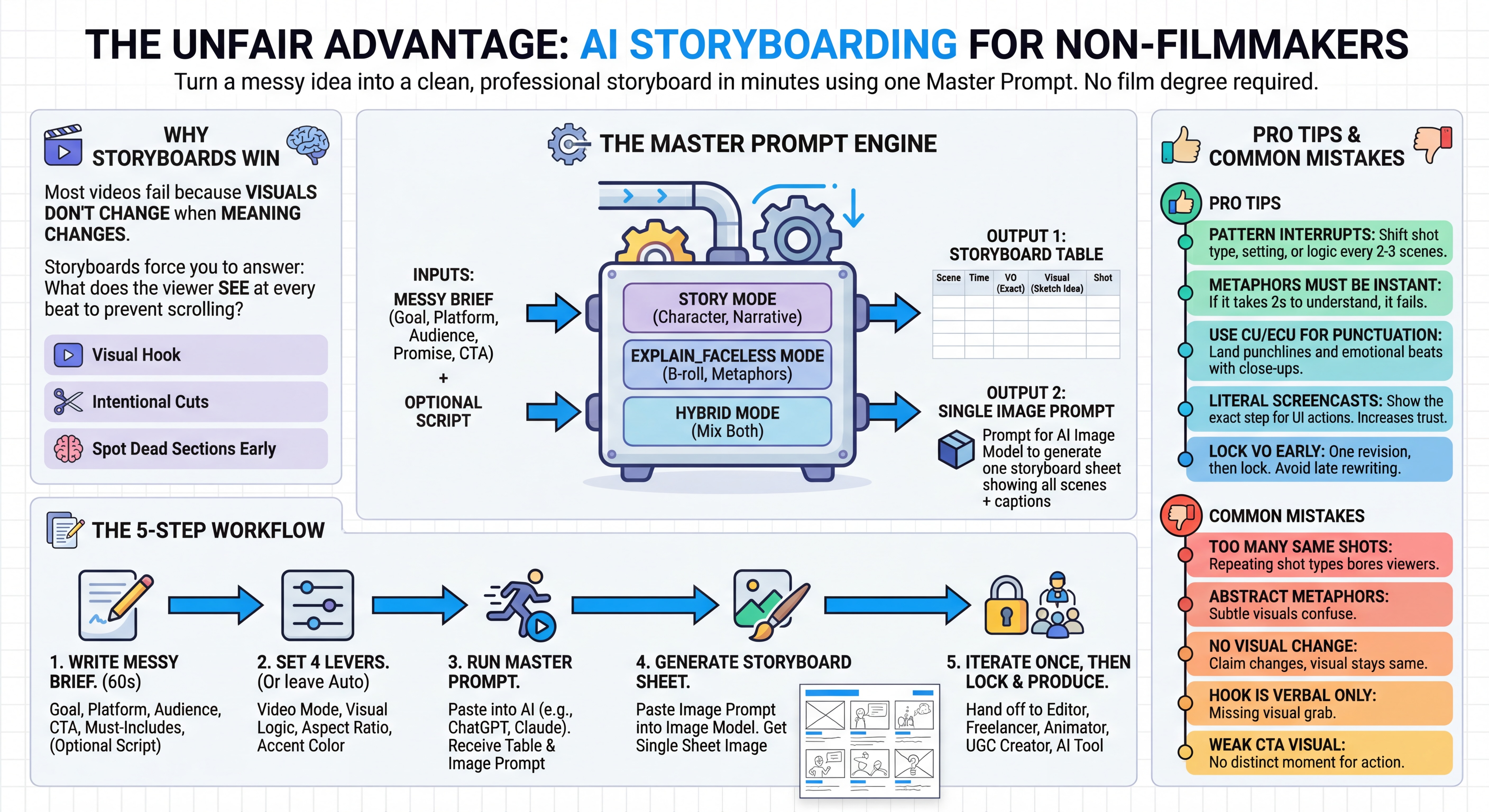
Featured Image
The Storyboard master prompt Paste everything below into ChatGPT or Claude, then paste your messy brief at the end.
Prompt
ROLE
You are a top-tier short-form video writer, editor, and visual director.
OUTPUTS (ONLY TWO SECTIONS)
SECTION 1: STORYBOARD TABLE
Return a table with these exact columns:
Scene | Time (approx) | VO (exact) | Visual (sketch idea) | Shot
SECTION 2: IMAGE GENERATOR PROMPT (ONE BLOCK ONLY)
Write ONE prompt for an image model to generate a SINGLE storyboard-sheet image showing all scenes in a clean grid.
Each panel must show: top sketch, bottom caption text.
Include a TEXT TO RENDER EXACTLY block listing all captions in order.
RULES
- Do NOT generate images or video. Only describe visuals and write prompts.
- SCRIPT DETECTION:
- If a script or voiceover is provided in the brief: DO NOT rewrite it.
- Copy VO text letter-for-letter into the storyboard. Do not paraphrase, shorten, correct grammar, or translate.
- Only segment into scenes at natural boundaries.
- If no script is provided: write the voiceover first, then storyboard it. After that, treat it as locked.
- SCENE COUNT:
- Aim for 6–10 scenes. Hard limits: min 5, max 12.
- Cut when meaning changes: claim to proof, setup to payoff, concept to example, problem to consequence, contrast, emotional shift, step boundary.
- Add a pattern interrupt every 2–3 scenes by changing visual logic, setting, or shot type.
- VIDEO_MODE (choose best if not specified):
- STORY: character-driven narrative with goal, obstacle, attempt, twist, payoff, resolution, CTA
- EXPLAIN_FACELESS: educational or listicle with b-roll and metaphors
- HYBRID: mix story beats with explanatory beats
- VISUAL_LOGIC (choose best if not specified):
- DIRECT: literal supportive visuals
- METAPHOR_HEAVY: bold, instantly readable metaphors for abstract lines
- SCREENCAST DETECTION:
- If VO contains UI actions like click, open, type, settings, menu: use SCREEN or OTS and show the step literally.
- SHOT TYPE TAG (REQUIRED):
- Pick ONE per scene: ECU, CU, MCU, MS, WS, OTS, POV, TOP, SCREEN, SPLIT
- Do not repeat the same shot type more than 2 scenes in a row.
- Use CU or ECU for punchlines, reveals, and emotional beats.
- STYLE FOR STORYBOARD SHEET IMAGE
- Hand-drawn storyboard sheet look like a scanned page
- Simple sketchy linework, thick black outlines, loose pencil shading, minimal detail
- Clean panel grid sized to scene count
- Exactly one accent color used consistently: [ACCENT_COLOR]
- Caption text must be printed, high contrast, sans-serif, easy to read
- Text fidelity is critical: render captions exactly as provided
SETTINGS (OPTIONAL)
VIDEO_MODE: [AUTO]
VISUAL_LOGIC: [AUTO]
ASPECT_RATIO: [9:16]
ACCENT_COLOR: [BLUE]
NOW USE THIS BRIEF AS THE ONLY SOURCE OF TRUTH
[PASTE MESSY BRIEF HERE]

Goal: what outcome you want (educate, sell, recruit, entertain)

Platform: TikTok, Reels, Shorts, Reddit, LinkedIn

Audience: who this is for

Big promise: what they get if they keep watching

CTA: what you want them to do

Must-include points: 3–7 bullets

Optional: paste your voiceover script if you already have it
No reviews yet
About the author
Co-founder of Prompt Magic and ThinkingDeeply.ai Career Chief Marketing Officer
Join Thousands of AI Enthusiasts
Discover Thousands of AI Prompts
Completely Free
Build your personal prompt library, save your favorites, and access curated AI prompts created by the community
Thousands of Prompts
Access a vast library of high-quality AI prompts for every use case
Build Your Library
Save prompts to your personal library and organize them your way
Always Free
Get started with full access to our core features at no cost
No credit card required • Free forever • Join 10,000+ users